Modern Mobility
In a world where the average professional travels with a laptop, tablet, smartphone, noise-canceling headphones, and perhaps a smartwatch or camera, the sheer volume of copper and silicon in a backpack is staggering. We are no longer just carrying "cables"; we are carrying a delicate ecosystem of power delivery and data transfer.
Consider a standard 14-inch MacBook Pro setup. Between the MagSafe cable, a high-wattage GaN charger, a USB-C hub, and perhaps an external SSD, you are looking at nearly $2,500 worth of equipment dependent on thin strands of wire. A single sharp bend in a fiber-optic cable or a crimp in a high-speed Thunderbolt 4 cord can render your entire setup useless.
Industry data suggests that the average business traveler spends roughly 10 to 15 minutes per day untangling cords or searching for specific adapters. Over a five-day trip, that is over an hour of billable time or leisure lost to poor organization. Furthermore, "cable fatigue"—the internal breaking of wire strands due to improper coiling—is the primary reason for charger failure, costing users billions annually in replacement parts.
Transit Pain Points
The most common mistake travelers make is "the stuffing method." Shoving a long laptop cord into the bottom of a bag places immense pressure on the connector necks. This leads to fraying, which isn't just an inconvenience; it’s a fire hazard. According to safety reports, frayed charging cables are a leading cause of small-scale electronic fires in hotel rooms.
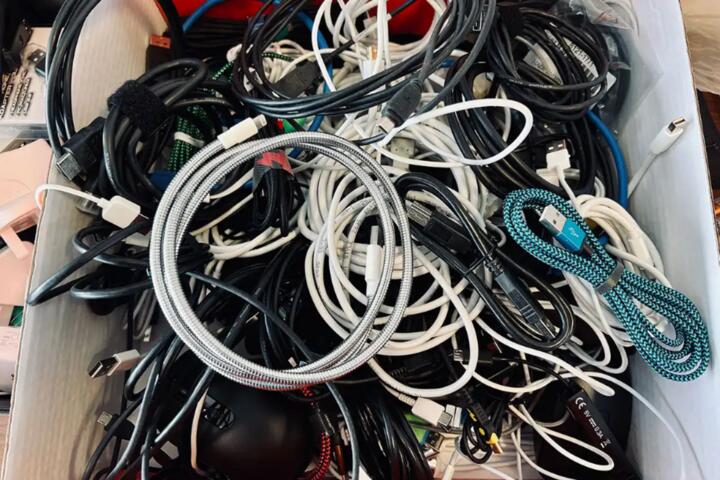
Another significant issue is "vampire tangling." This occurs when the Velcro or rubberized texture of one cable grabs onto the braided nylon of another. Once they settle during a turbulent flight or a bumpy Uber ride, they form a "Gordian Knot" that requires significant force to undo. This force often damages the internal shielding of the cables.
Real-world consequences often manifest at the worst times—at a TSA checkpoint or right before a presentation. I’ve seen professionals forced to buy $80 replacement chargers at airport kiosks because their original cord snapped during a hasty pack-out. The loss isn't just the money; it's the reliability of your workflow.
Cable Harmony
Implement the "Over-Under" Coiling Technique
Most people wrap cables around their hands, creating a natural twist in the wire that leads to kinks. Professionals in the audio/visual industry use the "over-under" method. This technique neutralizes the internal tension of the wire. When you go to use the cable, you can simply hold one end and toss the other; it will unspool perfectly straight without a single loop. This triples the lifespan of high-end cables like those from Anker or Nomad.
Standardize Your Ecosystem with GaN Technology
The biggest space-taker in any bag is the "power brick." Traditional silicon-based chargers are heavy and bulky. Switch to Gallium Nitride (GaN) chargers. A Satechi 165W USB-C 4-Port GaN Charger can replace four separate wall warts. By centralizing your power source, you reduce the number of wall-side cables you need to manage from four to one. This can reduce the weight of your tech kit by up to 40%.
Utilize Rigid-Wall Tech Organizers
Loose pouches allow cables to shift and rub. Instead, use a structured organizer like the Peak Design Tech Pouch or the Bellroy Tech Kit. These use "origami-style" internal pockets that keep each item in a fixed position. When items cannot move, they cannot tangle. This also provides a visual "inventory check"—if a slot is empty, you know you’ve left a cord in the hotel room.
Color-Code and Label for Speed
When you have five identical black USB-C cables, finding the 10Gbps data cable versus the 5W slow-charging cable is impossible. Use small colored heat-shrink tubing or specialized labels from Brother P-Touch. Labeling the wattage (e.g., "100W") on the head of the cable ensures you aren't trying to charge a power-hungry laptop with a low-output phone cord, which can lead to "battery drain while plugged in" issues.
Leverage Short-Length Cables for On-the-Go
You do not need a 6-foot cable to charge a phone from a power bank in your pocket. Replace your long travel cords with 0.5-foot (15cm) versions for mobile use. Brands like Native Union offer ultra-short, durable cables that fit in a coin pocket. This eliminates "slack," which is the primary ingredient of a tangle.
Efficiency Cases
Case 1: The Remote Consultant
A consultant at a "Big Four" firm was carrying 12 different cables and three power bricks for a weekly commute. By switching to a Peak Design ecosystem and a single Ugreen 100W GaN Desktop Station, they reduced their tech-bag weight from 4.5 lbs to 1.8 lbs. The "setup time" at client sites dropped from 6 minutes to 90 seconds, significantly increasing professional poise during meetings.
Case 2: The Production House Field Team
A small documentary crew struggled with "cable rot" (frequent failure of HDMI and SDI lines). By mandating the "Over-Under" wrap and utilizing BongoTies (heavy-duty elastic ties) for every cord, they reduced their annual cable replacement budget by $1,200. The structure allowed them to perform "blind grabs" from their equipment bags during low-light shoots without snagging unrelated gear.
Tech Checklist
| Task | Action Item | Core Benefit |
|---|---|---|
| Audit | Remove duplicates | Reduces volume by 20%. |
| Consolidate | Use multi-port GaN | Saves space and weight. |
| Secure | Apply Velcro ties | Prevents "vampire tangling". |
| Protect | Use hardshell cases | Prevents crush damage. |
| Verify | Test before leaving | Avoids hardware failure. |
| Map | Assign fixed pockets | Enables muscle memory. |
Common Errors
A common error is using plastic zip ties or tight rubber bands. These apply localized pressure that can cut through the delicate outer jacket of a cable. Always use Velcro One-Wrap or silicone magnetic ties. They provide enough grip to keep the coil together without "choking" the wire.
Another mistake is leaving cables plugged into power banks while they are in the bag. This puts immense lateral pressure on the USB port. Over time, this loosens the solder joints on the device's logic board, leading to intermittent charging. Always disconnect cables from ports before stowing them.
Many travelers also overlook the "dust factor." Lint from a backpack can get trapped inside a USB-C or Lightning port. If a cable feels "mushy" when you plug it in, don't force it. Use a wooden toothpick or a dedicated port cleaning tool to remove debris. Forcing a connection against lint can bend the internal pins, leading to a permanent hardware failure.
FAQ
Why should I choose braided cables over standard rubber ones?
Braided nylon cables (like those from Belkin or Anker) offer higher abrasion resistance and are less likely to "stick" to other cables. They also have a higher "bend tolerance," meaning they can be flexed more times before the internal wires snap.
What is the best way to carry a high-end laptop charger?
Never wrap the thin "output" cord tightly around the brick itself. This creates a sharp 90-degree bend at the point of entry. Instead, leave a 2-inch "loop" of slack at the base before you start coiling the rest of the cable.
How do I manage international plug adapters without adding bulk?
Look for "Global GaN" chargers that have interchangeable faceplates (UK/EU/US/AU). This is much more stable and compact than plugging a standard charger into a bulky "universal" travel adapter.
Are magnetic cable organizers worth it?
For a stationary desk, yes. For a travel bag, they can be risky. Strong magnets can potentially interfere with older mechanical hard drives or credit card strips, though they are generally safe for modern SSD-based laptops and smartphones.
How can I stop my cables from fraying at the ends?
The best preventive measure is a "cable protector" or simply ensuring you never pull the cable by the wire—always grab the plastic or metal housing of the plug itself.
Author’s Insight
In my fifteen years of traveling through 40+ countries with a full mobile studio, I’ve learned that organization isn't about aesthetic; it's about "functional readiness." My biggest breakthrough was adopting a "one-in, one-out" policy for adapters. If I buy a new multi-function hub, the old single-purpose dongles must leave the bag immediately. I personally swear by the "Rule of Three": I never carry more than three types of connections (USB-C, Micro-USB for legacy gear, and a Watch puck). If a piece of tech requires a fourth type of proprietary cable, I usually don't bring it. Keeping your kit lean is the ultimate defense against the "tech tangle."
Summary
Managing a modern tech kit requires a shift in perspective from "carrying things" to "maintaining a system." By investing in high-quality GaN charging hubs, employing professional coiling techniques, and utilizing structured organizers like those from Peak Design or Bellroy, you turn a chaotic mess into a streamlined mobile office. Start by auditing your current bag today: remove any cable you haven't used in six months and replace your bulky power bricks with a single, high-wattage alternative. This small investment in organization yields massive returns in hardware longevity and travel peace of mind.