The Mechanics of Atmospheric Tracking
Modern adventure watches, such as the Garmin FusedAlti system or Suunto’s FusedAlti technology, do not actually measure height. They measure the weight of the air above you. As you ascend, the air becomes less dense, and pressure drops. A standard silicon pressure sensor inside your watch detects this change and converts it into a digital elevation reading based on the International Standard Atmosphere (ISA) model.
The ISA assumes that at sea level, the temperature is 15°C and the pressure is 1013.25 hPa. However, the mountains rarely follow the textbook. A sudden cold front or a low-pressure system moving through the Alps or the Cascades can trick your watch into thinking you’ve climbed 50 meters while you were actually asleep in your tent.
Practical data shows that a change of just 1 hPa in sea-level pressure results in approximately 8 to 9 meters of elevation error. If you don't calibrate before a summit push, a typical weather shift of 10 hPa could leave you looking for a trail junction that is nearly 100 meters away from your actual position.
Why Precision Fails: The Cost of Neglect
The most significant pain point for mountain navigators is "altimeter drift." This happens when the user relies on the factory settings or an initial calibration from three days prior. In high-stakes environments, relying on an uncalibrated watch is often worse than having no watch at all, as it creates a false sense of security.
I have seen experienced trekkers miss the turn-off for the Hornli Ridge on the Matterhorn because their watch suggested they were still 40 meters below the shoulder. In low visibility, vertical error is the primary cause of "cliffing out"—the dangerous situation where a navigator believes they are on a bench or plateau but is actually standing above a drop-off.
Another common error is the over-reliance on "Auto-Calibration." While features like Garmin’s continuous calibration use GPS to correct the barometer, GPS vertical accuracy is notoriously poor. A standard GPS signal has a vertical margin of error roughly 1.5 to 3 times its horizontal error. Without a manual "anchor" to a known survey point, your elevation data can fluctuate wildly as satellite geometry changes.
Protocol for High-Fidelity Elevation Data
Establishing a Reference Benchmark
The gold standard for calibration is using a known survey marker. Before starting a climb at a trailhead, look for United States Geological Survey (USGS) markers or local topographic map peaks. If you are at a trailhead, check the informational signage; these often provide the exact elevation. Input this number manually into your watch settings. This creates a "Zero Point" that is far more accurate than any satellite-derived measurement.
Synchronizing with Local QNH
If no physical marker is available, use your smartphone to find the nearest airport’s METAR (Meteorological Aerodrome Report) or a service like Windy.com. Look for the "QNH"—the barometric pressure adjusted to sea level. By entering the current local pressure into your watch, the internal sensor can calculate your current elevation based on the delta between your location and sea level. This is the same method bush pilots use to ensure they don't hit ridges in the clouds.
Leveraging High-Resolution Topographic Maps
In the field, use digital mapping tools like Gaia GPS or Fatmap. These apps use high-resolution Digital Elevation Models (DEM). If you are standing at a distinct geographic feature, such as a lake shore, a col, or a peak, cross-reference your position on the map. If the map says the lake is at 2,450 meters and your watch says 2,415, calibrate immediately. This "mid-route correction" is essential for long-range traverses where weather systems are dynamic.
Managing Temperature-Induced Distortion
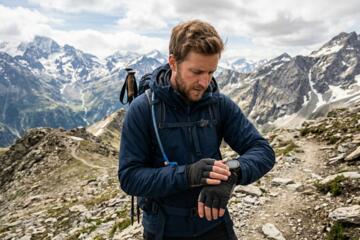
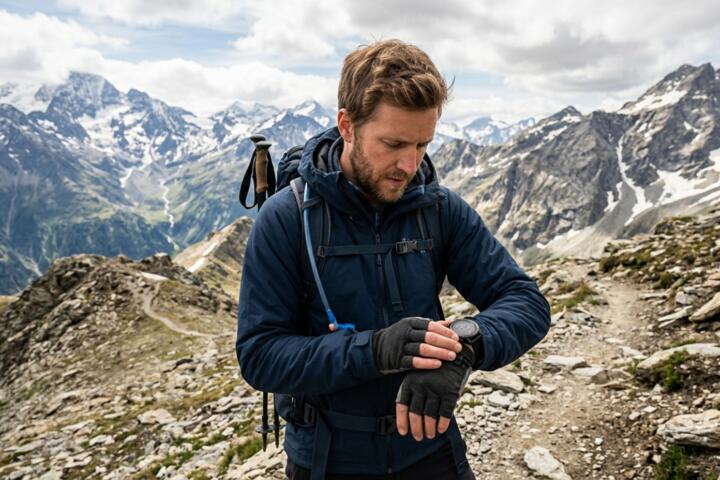
Temperature affects air density, which in turn affects barometric readings. Most high-end units, like the COROS Vertix 2 or the Suunto 9 Peak Pro, have internal temperature compensation. However, if your watch is under a heavy down jacket, your body heat can warp the sensor's perception of the ambient air. For the highest precision during a critical navigation leg, wear the watch outside your sleeve or allow it to acclimate to the outside air for 10 minutes before trusting a reading.
The Role of GPS-Barometer Fusion
In modern ecosystems, "Hybrid" or "Fused" calibration is the most efficient hands-off method. Devices like the Apple Watch Ultra 2 or Garmin Fenix series use a background algorithm that compares GPS elevation trends with barometric changes. If the GPS sees you are staying level but the barometer says you are rising (likely due to a falling pressure system/incoming storm), the software suppresses the elevation change. Ensure this feature is toggled "On," but never let it replace a manual check at a known waypoint.
Weather Trend Monitoring
A calibrated altimeter is also a powerful barometer. If you are at a stationary camp and your elevation reading starts "climbing" while you are sitting still, it means the atmospheric pressure is dropping. A rise of 30 meters in "apparent altitude" over 3 hours is a classic warning sign of an approaching storm. Real-world data suggests that a pressure drop of 1 hPa per hour is a reliable indicator of deteriorating weather conditions.
Strategic Execution: Real-World Scenarios
Case Study 1: The Chamonix-Zermatt Haute Route
A guided group was navigating the Pigne d’Arolla section in heavy fog. The lead guide used a Garmin Epix Pro. At the start of the day (Arolla), they calibrated to the known village height of 1,631m. Mid-day, the pressure dropped by 4 hPa due to a passing front. By manually re-calibrating at the Col de Collon using a known map point, the guide corrected a 35-meter error. This precision allowed them to find the narrow ramp leading to the Dix Hut, avoiding a dangerous detour into a crevasse field.
Case Study 2: Fast-and-Light Sierra Ascent
A solo runner on the High Sierra Trail relied solely on "Auto-Calibrate." Over 12 hours and 2,000 meters of vertical gain, the cumulative GPS error and a shifting afternoon thermal created a 60-meter discrepancy. The runner reached what they thought was the final ridge, only to realize they were still 200 vertical feet below the pass. The result was a loss of daylight and a forced bivouac. This highlights that "Auto" is not "Absolute."
Pre-Departure Calibration Checklist
- 24 Hours Prior: Check the regional weather forecast. Note if a high or low-pressure system is moving in.
- At the Trailhead: Identify the elevation via a topo map or USGS marker. Disable "Auto-Update" if you are in a deep canyon with poor satellite reception.
- During the Ascent: Recalibrate at every major landmark (lakes, passes, summits).
- The 30-Minute Rule: If the weather noticeably shifts (wind picks up, clouds drop), check your sensor against a map immediately.
- Post-Activity: Check the "Total Ascent" data. If it seems inflated compared to the map, your sensor port may be clogged with sweat or debris.
Common Pitfalls in Sensor Management
One of the most frequent mistakes is blocking the barometer sensor port. On many watches, this is a small hole on the side of the casing. If your wrist bone presses against it or if it’s clogged with sunscreen and dried sweat, the pressure readings will flatline or spike. Clean your watch with fresh water after every heavy outing to ensure the sensor "breathes" correctly.
Another error is calibrating while moving. Always stand still for 30–60 seconds before a manual calibration. This allows the GPS to settle (if using GPS-based calibration) and the barometer to stabilize after the micro-pressure changes caused by the movement of your arm.
Users also frequently confuse "Pressure Altitude" with "Density Altitude." For navigation, you only care about Pressure Altitude corrected to your current location. Ignore aviation-style density altitude settings unless you are calculating takeoff performance for a mountain bush plane.
FAQ
How often should I calibrate my altimeter during a day hike?
At a minimum, you should calibrate at the start of the hike and at the highest point. For technical terrain or changing weather, a check every 2 hours is recommended.
Is GPS elevation or barometric elevation more accurate?
Barometric elevation is more precise for tracking small changes in vertical movement (granularity), but it requires a reference point. GPS is better for general location but suffers from "jitter." A calibrated barometer is always superior for mountain navigation.
Does temperature affect my altimeter's accuracy?
Yes. Cold air is denser than warm air. If you are hiking in extreme cold, your barometric altimeter will likely over-report your altitude unless your watch has active temperature compensation.
Why does my altitude change when I'm inside a building?
HVAC systems and sealed windows create artificial pressure environments. Never calibrate your watch indoors; always do it in the open air where the sensor can access ambient atmospheric pressure.
What is the best app for finding my current elevation for calibration?
For North America, the USGS "Elevation Point Query Service" is excellent. Globally, apps like PeakVisor or Gaia GPS provide reliable DEM data that you can use as your calibration reference.
Author’s Insight
In my years of testing gear in the North Cascades, I've found that the best technology is only as good as its last calibration. I never trust the "out of the box" elevation. I make it a ritual to calibrate at the trailhead while my boots are being laced. Even the most expensive $1,000 adventure watches are susceptible to the laws of physics. If you want to stay on the route, treat your altimeter like a compass: check it often, verify it against the terrain, and never assume it knows more than the map in your hand.
Conclusion
Accurate mountain navigation relies on the disciplined calibration of your barometric sensor. By understanding that your watch is a pressure-sensitive instrument rather than a simple GPS receiver, you can account for weather shifts and technical errors. Use known trailheads, map benchmarks, and local QNH settings to anchor your device. In the mountains, vertical accuracy isn't just a metric; it is a critical safety component that ensures you remain on the path and off the cliffs. Establish your baseline, monitor the trends, and always verify your sensor against the physical landscape.